


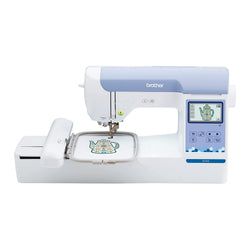
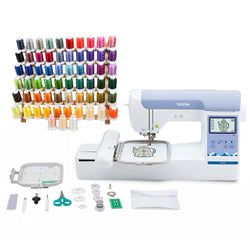
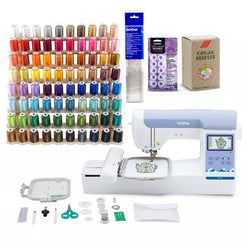
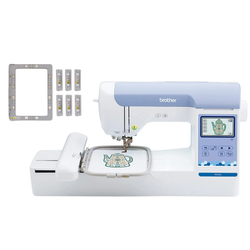
Brother Elite PE900 Large Embroidery Machine Bundle with Magnetic Hoop
Product highlights
Product highlights
In the box
In the box
Free standard shipping
Free standard shipping
*Orders placed before 3 PM EST Mon - Friday will ship the same day. Orders placed beyond these hours will be shipped the next business day. Exclusions apply. See shipping policy
Free Local Pickup
Free Local Pickup
Please call for store stock availability. Requests made before 2:30 PM EST can be available for next-day pickup. Learn more

Brother Elite PE900 Large Embroidery Machine Bundle with Magnetic Hoop

Brother Elite PE900 Large Embroidery Machine with Wireless LAN Connection and 193 Built-In Designs
Add a personalized touch to your projects with the Brother PE900 Embroidery Only Machine. Featuring 193 built-in designs and 13 fonts, plus access to thousands more on the Brother iBroidery platform, the PE900 offers endless creative possibilities. With a spacious 5 x 7-inch embroidery area and speeds up to 650 stitches per minute, you can bring your designs to life quickly and efficiently.
LCD Display
The PE900 includes a 3.7-inch LCD display for easy on-screen editing, including resizing, rotating, repositioning, combining designs, and letter editing. Its 7.4-inch needle-to-arm space allows for smooth use of frames like the 4 x 7-inch magnetic hoop, giving you ample room to work.
Wireless LAN Enabled
Transfer designs wirelessly from your PC with the free Design Database Transfer software—no USB needed. You can also use PE-Design 11 for more advanced design options, making project management simple and efficient.
Artspira App
Download embroidery patterns, draw custom designs, or use shapes and pen tools directly in the Artspira App. Create line-art-inspired embroidery up to 5 x 7 inches and transfer wirelessly to your machine. The built-in Stitch Simulator lets you preview designs before stitching, and you can share creations easily on social media.
Design Database Transfer
Import files with the USB port or choose from over 5000 designs on iBroidery.com. The PE900’s Advanced Automatic Needle Threader and thread cutter button save time and effort, streamlining your embroidery process.
Color Sort
The Color Sort feature reduces thread changes by adjusting the order of multi-color designs. The jump stitch trimming function automatically cuts excess thread, producing cleaner, more professional results.
Sew Faster with Jump Stitch Trimming
With automatic trimming of thread jumps, the PE900 delivers polished embroidery while saving time on finishing work.
Compatible with the iBroidery Design Library
Unlock over 5000 unique embroidery designs through Brother’s iBroidery platform, giving you the inspiration and resources to expand your creativity.
Brother 4 x 7 Inch Magnetic Hoop – Easy, No-Mark Embroidery Frame for Fabrics up to 2MM
The Brother SAMF180N 4 x 7-inch Magnetic Hoop is a genuine Brother accessory designed for machines with a 5 x 7-inch embroidery field, offering fast, easy, and mark-free embroidery. Using six strong magnets, it securely holds fabrics up to 2MM thick without clamping or pressure, eliminating hoop burns and residual marks—ideal for delicate materials. Its flat, non-sliding frame ensures stability, easy rehooping, and consistent results, while allowing creative flexibility for combining small designs or adding custom text. Compatible with Brother models like PE800, PE900, SE1900, SE2000, NS1250E, and NS2850D, this magnetic hoop enhances workflow, accuracy, and convenience for both beginners and experienced embroiderers.
Main
| Configuration | Bundle 1 |
| LCD Screen Size | 3.7" |
| Type | Standard |
| Light Type | LED |
| Color | White |
Brother Elite PE900 Large Embroidery Machine
Basic Features
| Accessory storage | Yes |
| Adjustable presser foot pressure | Yes |
| Adjustable screen brightness | No |
| Automatic thread cutter | Yes |
| Built-in languages | Yes |
| Built-In memory | Yes |
| Feed dog points | 7 |
| Included accessory feet | Embroidery foot |
| Needle position key (up/down) | Yes |
| Presser foot leveling | Yes |
| Quick set bobbin | Yes |
| Start/stop button | Yes |
| Thread sensor | Bobbin sensor upper thread sensor |
| Thread sensor on/off | No |
| USB | Yes |
| Wide table included | No |
| Wireless enabled | Yes |
| Workspace area | 7.4 x 4.1-inch |
Dimensions
| Unit dimensions (W x D x H) | 9.49 x 17 48 x 11 81-inch |
| Unit weight | 17.64lb |
Embroidering
| Built-in designs | 193 |
| Built-in embroidery designs featuring Disney/Pixar characters | 193 |
| Built-in embroidery lettering alphabet fonts | 13 |
| Maximum embroidery area | 5 x 7-inch |
Brother 4 x 7 Inch Magnetic Hoop
| Model Number | SAMF180N |
| Hoop Size | 4 x 7 inches |
| Compatible Embroidery Field | 5 x 7 inches |
| Material Thickness Compatibility | Up to 2MM |
| Magnet Type | Flat, non-sliding magnetic frame with 6 included magnets |
| Suitable For | Embroidery on delicate and standard fabrics |
| Brand | Brother Genuine Accessory |
Shipping & Returns

Frequently Asked Questions
How do I return an item?
How do I return an item?
Returns are incredibly simple. Please log into your account, find your item you wish to return and follow the prompts to make a return. If you do not have an account, click here to find your order and make a return.
Will I receive a full refund when I return an item?
Will I receive a full refund when I return an item?
You will receive a full refund when you return an item in its original manufacturer’s packaging, undamaged and unmarked. If the item you are returning is priced at less than $35, you will be charged a 15% restocking fee. Please note you will not be refunded any shipping charges.
How many days do I have to make a return?
How many days do I have to make a return?
You have 30 days to make a return. During the holiday season, from November 1 to December 31, we extend the return window to 60 days.
My item was damaged in transit. How do I place a return?
My item was damaged in transit. How do I place a return?
If your order has been noticeably damaged in transit, we strongly recommend that you refuse delivery and notify us immediately. Claims for missing items or items damaged in transit must be made within 48 hours of delivery. If there is carrier damage, please contact support@focuscamera.com with your order number and a description of the damage.
There’s an issue with my order, what should I do?
There’s an issue with my order, what should I do?
Oh no! Please contact our customer service team so we can resolve the issue immediately. You can call us on 1.800.221.0828, email us at support@focuscamera.com, or send us a message here.
Can I exchange an item?
Can I exchange an item?
We do not currently offer exchanges. Please return the item you purchased within 30 days and order what you’d like instead.
If I ordered a kit, do I have to return all the items?
If I ordered a kit, do I have to return all the items?
If you ordered a kit, you must return all components and accessories to receive a full refund.
I ordered a product that included a free item. I’d like to return it, do I need to return the free item as well?
I ordered a product that included a free item. I’d like to return it, do I need to return the free item as well?
If you ordered a product that included a free item, you must include the free item with your return. If not, your return will not be accepted and you will not receive a full refund.
Do you offer repairs?
Do you offer repairs?
We currently only offer camera repairs at our Brooklyn store. The item must be dropped off and collected in person as we do not accept shipped items for repair. For more information, please call our Brooklyn store on 1.718.431.7900.
What is your return policy?
What is your return policy?
Most items can be returned within 30 days for a full refund. Click here to read our full return policy.